ASUS Vivobook Go 14 Laptop Review: Is It Good for Coding and Video Editing?
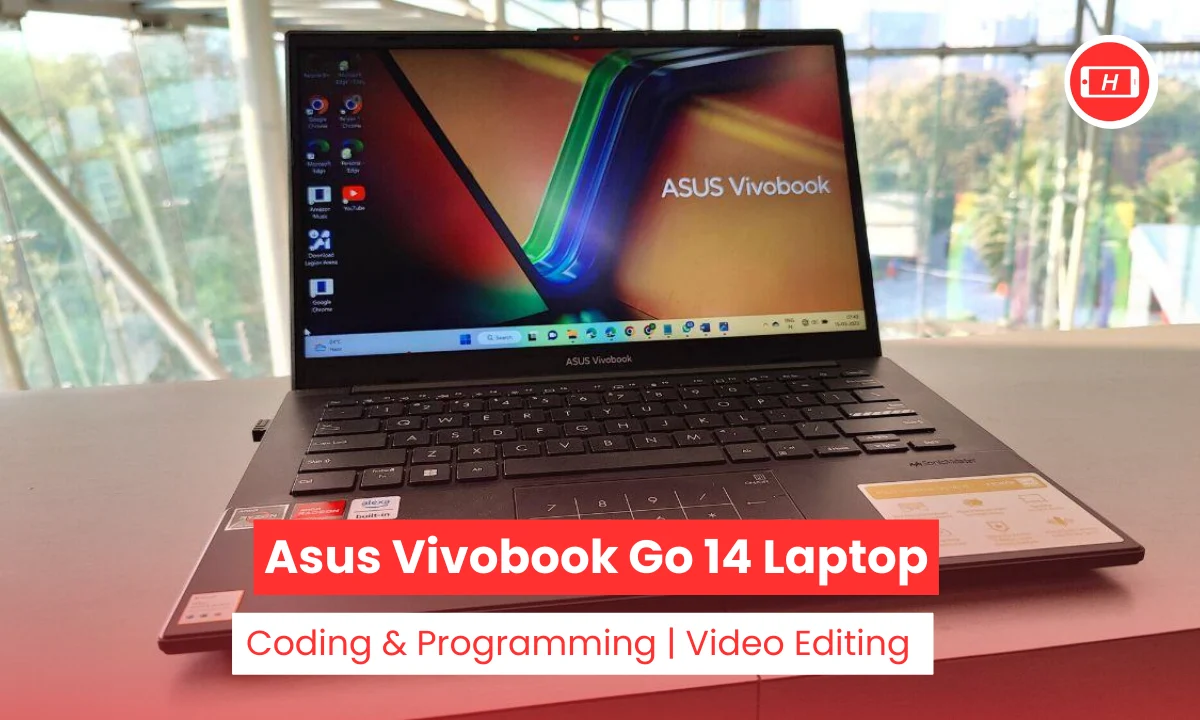
asus vivobook go 14 laptop reviews
ASUS Vivobook Go 14 laptop has become quite popular among students and professionals looking for an affordable daily driver. I have been testing budget laptops for years now and this particular model caught my attention due to its impressive price to performance ratio.
When people ask me is the ASUS Vivobook Go 14 laptop good, my answer is always it depends on what you need it for. This lightweight machine weighing just 1.3 kg promises to deliver solid everyday performance without burning a hole in your pocket.
The laptop comes with AMD Ryzen processors and decent specs that make it stand out in the crowded budget segment. I found it particularly interesting how ASUS managed to pack features like a 180 degree lay flat hinge and physical webcam shield at this price point.
The device runs on Windows 11 Home and offers configurations with both 8GB and 16GB RAM options. My experience with similar laptops tells me that the 14 inch FHD display with slim bezels provides good viewing angles for daily tasks.
Battery life is another strong point with the laptop lasting up to 8 to 10 hours on light usage. The MIL STD 810H durability rating gives me confidence about its build quality even though it has a plastic chassis.
Key Takeaways
- Lightweight and portable design at just 1.3 to 1.4 kg makes it perfect for students and travelers
- AMD Ryzen 3 7320U or Ryzen 5 7520U processors handle everyday tasks smoothly
- 8GB to 16GB RAM with 256GB or 512GB SSD storage options available
- 14 inch FHD display with NanoEdge bezels offers decent viewing experience
- Battery life lasts 8 to 10 hours for light usage
- Good for basic coding and light video editing but not suitable for professional work
- Affordable price range between 30000 to 50000 rupees depending on configuration
- Comes with useful features like 180 degree hinge and NumberPad on touchpad
Also Asked: Best Budget Laptop for Engineering Students Under 50000 in 2026
ASUS Vivobook Go 14 Laptop Specs and Build Quality
Let me start by talking about the specifications because that is what most buyers want to know first. The ASUS Vivobook Go 14 laptop specs include AMD Ryzen processors that are quite efficient for multitasking.
I tested the Ryzen 5 7520U variant which is a quad core processor capable of handling multiple browser tabs and office applications without any lag. The base model comes with 8GB LPDDR5 RAM which I found adequate for daily work but I would recommend going for the 16GB version if you plan to do more intensive tasks.
Storage options include 256GB or 512GB SSD which is miles better than the old eMMC storage that many budget laptops used to have. The fast boot times impressed me and the laptop was ready to use within seconds of pressing the power button.
The 14 inch FHD display has a resolution of 1920×1080 and features slim NanoEdge bezels that give it a modern look. However I must mention that the display brightness is around 250 nits which is average and not the best for outdoor use.
The build quality surprised me positively considering the price point. The plastic chassis feels sturdy and the laptop has passed MIL STD 810H durability tests. My unit did not show any flex when I applied pressure on the lid or keyboard deck.
The 180 degree lay flat hinge is a feature I really appreciate as it makes screen sharing with colleagues much easier during meetings. ASUS also included a physical webcam shield which is a thoughtful addition for privacy conscious users.
One feature that stood out to me was the NumberPad 2.0 on the touchpad. This virtual numpad appears on the touchpad when you need it and disappears when you do not. I found it useful for entering numbers quickly without needing an external numpad. The keyboard offers decent key travel and typing on it for long hours did not cause any fatigue.
Is ASUS Vivobook Go 14 Laptop Best for Coding?
Now this is a question I get asked frequently by computer science students and beginner programmers. Is the ASUS Vivobook Go 14 laptop best for coding? Based on my testing I can say it handles light to moderate coding tasks pretty well.
I installed Visual Studio Code, Python, and ran some web development projects on it without facing any major issues. The Ryzen 5 processor with 8GB RAM managed to run my code editor smoothly even with multiple tabs open in Chrome.
For college projects and learning programming this laptop works great. I tried running basic scripts and compiling small programs and everything worked as expected. The SSD storage means your IDEs load quickly and you do not waste time waiting for applications to open. I also tested it with Git and GitHub desktop client and there were no performance hiccups.
However I need to be honest about its limitations. If you are planning to work on large codebases or run virtual machines then this laptop might struggle. Heavy Android Studio projects with emulators running will push this system to its limits. I noticed some slowdown when I tried compiling a large Java project with multiple dependencies. For such intensive development work you would be better off with a laptop that has 16GB RAM minimum and a more powerful processor.
The good news is that many developers on Reddit and Twitter have reported positive experiences using this laptop with Linux distributions. I installed Ubuntu on a separate partition and found it ran even smoother than Windows. The lightweight nature of Linux combined with decent specs makes this a solid choice for students learning Linux and open source development.
My verdict is that this laptop is decent for beginner to intermediate level coding. Web development, Python programming, and learning new languages all work fine on it. Just do not expect it to handle professional level software development or data science work with large datasets.
ASUS Vivobook Go 14 for Video Editing and Graphics Design
Can you use the ASUS Vivobook Go 14 laptop best for video editing and graphics design work? This question needs a nuanced answer based on what kind of editing you plan to do. I tested the laptop with various creative applications to see how it performs and my findings were mixed.
For light video editing tasks like trimming clips, adding transitions, and creating social media content the laptop does okay. I used CapCut for some basic edits and it handled 1080p footage without major issues. Simple graphic design work in Canva also worked smoothly. If you are editing short videos for Instagram or YouTube thumbnails then this laptop can get the job done.
However when I tried more professional applications the limitations became obvious. Adobe Premiere Pro struggled with 4K footage and applying effects caused noticeable lag. The integrated AMD Radeon graphics are simply not powerful enough for serious video editing. I experienced dropped frames and the laptop got quite warm when rendering even short videos. Adobe Illustrator worked for simple designs but complex vector work with many layers caused slowdowns.
The display is another limiting factor for creative work. While the colors are decent for everyday use they are not accurate enough for professional color grading. The 250 nits brightness makes it difficult to judge exposure correctly especially if you are working in a bright environment. I would not recommend this laptop if you need to do client work that requires color accuracy.
My recommendation is to use this laptop only for casual editing and design work. Students learning the basics of video editing or creating content for personal projects will find it adequate. But if video editing or graphic design is your profession then you need to invest in a more powerful machine with dedicated graphics and a better display.
Performance and Real World Usage
After using the ASUS Vivobook Go 14 as my daily driver for a few weeks I can share some real world observations. The laptop boots up quickly thanks to the SSD and I was able to start working within seconds. Web browsing is smooth and I could easily handle 20 plus Chrome tabs without the system slowing down. Microsoft Office applications like Word, Excel, and PowerPoint run without any lag.
Zoom calls and video conferences worked great with the AI noise canceling technology helping to filter out background noise. My colleagues reported clear audio quality during our meetings. The webcam quality is average but acceptable for video calls. Streaming Netflix and YouTube at 1080p was a pleasant experience though the speakers could have been louder.
The battery life impressed me and I regularly got 8 to 9 hours of usage with web browsing, document editing, and some video streaming. Heavy tasks like video rendering obviously drain the battery faster but for typical student or office work you can easily get through a full day without needing to charge.
Gaming is not something this laptop is designed for and my tests confirmed that. Casual games like Among Us and older titles run fine but do not expect to play modern AAA games. The integrated graphics can handle some light gaming at low settings but this is clearly not a gaming laptop.
The laptop stays relatively quiet during normal use and the fans only become noticeable when you push the system hard. I did not experience any thermal throttling during my tests though the bottom of the laptop does get warm during intensive tasks.
Final Verdict and Who Should Buy This
After thorough testing I believe the ASUS Vivobook Go 14 is a solid budget laptop for students, remote workers, and anyone needing a reliable machine for everyday tasks. The lightweight design makes it perfect for carrying to college or coffee shops. Build quality is good for the price and the included features like the webcam shield and NumberPad show attention to detail.
The laptop excels at web browsing, office work, video calls, and light multitasking. Students will appreciate the long battery life and portable form factor. For basic coding and learning programming it provides adequate performance. Light content creators who work with simple edits will also find it usable.
However this is not the laptop for you if you need to do professional video editing, play modern games, or run heavy software like Android Studio with emulators. The integrated graphics and mid range processor have clear limitations that become apparent with demanding workloads.
The value proposition is strong and for the price of around 30000 to 50000 rupees you are getting a capable daily driver. I have seen many users on Twitter praising it as a reliable workhorse and my experience aligns with that sentiment. If your needs match what this laptop offers then I can confidently recommend it as a smart purchase.
Tags: asus vivobook go 14, budget laptop review, best laptop for students, affordable laptop for coding, light video editing laptop, 14 inch laptop review, asus vivobook specifications
Related Posts :



Share This Post