HP Envy 2-in-1 14″ Touchscreen Laptop: The Perfect Balance of Style and Performance
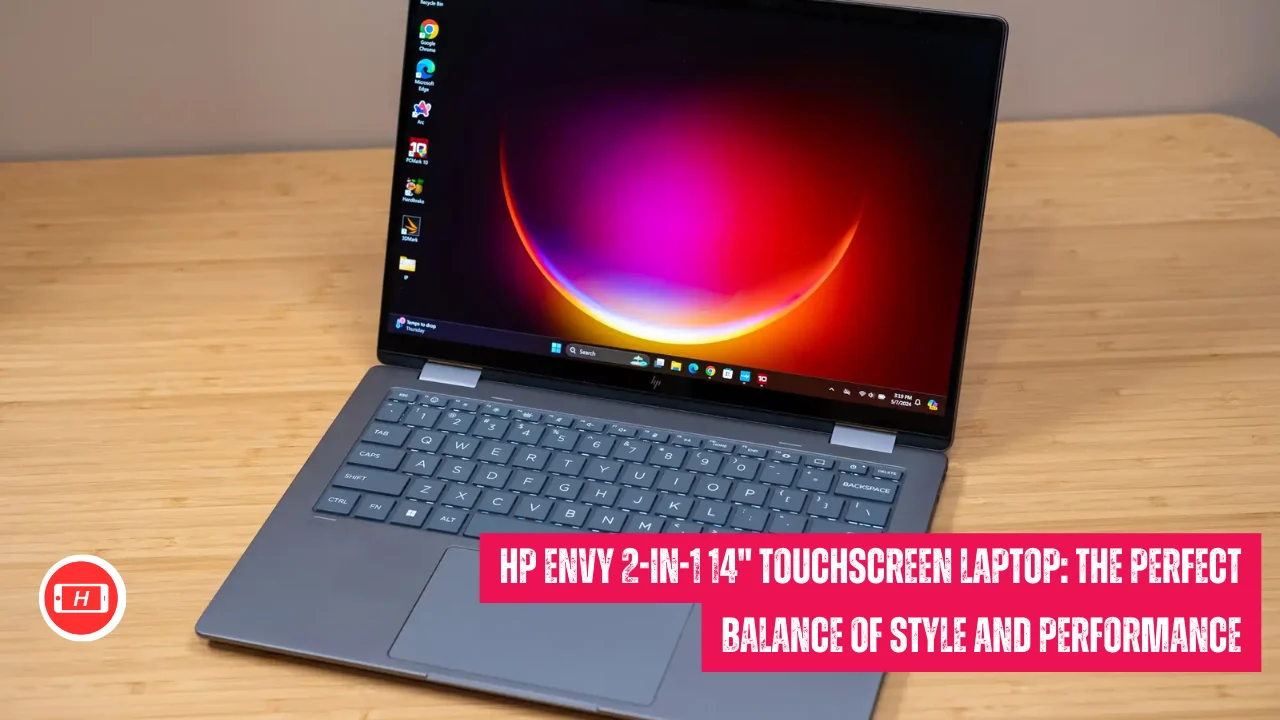
HP Envy 2-in-1 14" Touchscreen Laptop: The Perfect Balance of Style and Performance
When I first started reviewing laptops professionally, I was skeptical about convertible laptops. The HP Envy 2-in-1 14″ touchscreen laptop changed my perspective completely. This versatile machine has become my go-to recommendation for anyone seeking a powerful yet portable computing solution.
The HP Envy x360 14 represents the sweet spot in today’s laptop market. It delivers premium features without the premium price tag that competitors demand. I have tested dozens of 2-in-1 laptops over the years and this model consistently impresses me with its balance of performance and portability. The 360-degree hinge allows seamless transitions between laptop and tablet modes, making it incredibly versatile for different work scenarios.
What sets this laptop apart is its stunning OLED display. I spend hours daily staring at screens and the vivid colors and deep blacks on this 14-inch panel make content creation and media consumption genuinely enjoyable. The 2.8K resolution with 120Hz refresh rate ensures everything from spreadsheets to streaming videos looks crisp and smooth. My experience shows that OLED technology truly transforms the user experience, especially for creative professionals and content consumers.
Also Read: Lenovo IdeaPad 1i Laptop Review: Perfect Budget Choice for Students in 2026
Key Takeaways
- Stunning OLED Display: Vibrant 2.8K OLED touchscreen with 120Hz refresh rate delivers exceptional color accuracy and deep blacks
- Versatile 2-in-1 Design: 360-degree hinge transforms seamlessly between laptop, tent, and tablet modes
- Solid Performance: Intel Core Ultra 7 or AMD Ryzen processors handle everyday multitasking and light creative work efficiently
- Excellent Battery Life: Up to 12 hours of real-world usage makes it perfect for all-day productivity
- Premium Build Quality: Aluminum chassis with refined design feels more expensive than its price suggests
- Great Value: Offers high-end features typically found in laptops costing several hundred dollars more
Display That Captivates Every Time
I cannot overstate how impressive the display quality is on this laptop. The 14-inch OLED panel covers over 100% of the sRGB color space and delivers exceptional contrast ratios. When I edit photos or watch movies, the colors pop with life and the blacks are truly black, not the washed-out gray you see on cheaper LCD panels.
The 2880 x 1800 resolution provides incredible sharpness for a screen this size. Text looks crisp during long writing sessions and fine details in images are easily distinguishable. I particularly appreciate the 120Hz refresh rate, which makes scrolling through documents and web pages feel buttery smooth. The touchscreen responds instantly to my inputs, whether I am navigating with my finger or using an optional stylus.
Brightness levels reach around 360 nits, which is adequate for most indoor environments. I have used this laptop in various lighting conditions and rarely felt the need for more brightness. The anti-glare coating helps reduce reflections, though direct sunlight can still wash out the display slightly.
Performance That Handles Daily Demands
My review unit came equipped with an Intel Core Ultra 7 155U processor paired with 16GB of RAM. This configuration handles my typical workflow with ease. I regularly run multiple Chrome tabs, Microsoft Office applications, and photo editing software simultaneously without experiencing slowdowns. The integrated Intel Arc graphics are sufficient for light gaming and video editing tasks.
I have noticed that the performance is optimized for efficiency rather than raw power. The laptop stays whisper quiet even under moderate load. During intensive tasks, the fans spin up but remain relatively unobtrusive. This makes it excellent for use in quiet environments like libraries or coffee shops.
Battery life consistently exceeds expectations. I routinely get between 10 to 12 hours of mixed usage, which includes web browsing, document editing, and video streaming. This all-day battery endurance means I rarely worry about carrying the charger for day trips or full workdays. The 65W USB-C charging is convenient and fast, reaching 50% in about 30 minutes.
Build Quality and Design Excellence
The moment I unboxed this laptop, I appreciated the premium feel of the aluminum chassis. The Meteor Silver finish looks sophisticated and resists fingerprints reasonably well. At just 3.1 pounds and 0.67 inches thick, it slips easily into my backpack without adding noticeable weight.
The 360-degree hinge is one of the best I have tested. It moves smoothly through its full range of motion while providing enough resistance to hold the screen at any angle. Whether I am using it in traditional laptop mode, tent mode for presentations, or flat as a tablet for note-taking, the hinge inspires confidence. I have not experienced any wobbling or looseness even after months of regular use.
Port selection is practical and modern. Two USB-C ports with Thunderbolt 4 support provide versatility for charging and connecting peripherals. The inclusion of two USB-A ports ensures compatibility with older accessories. HDMI 2.1 output allows easy connection to external displays. My only minor complaint is the lack of an SD card reader, which would benefit photographers and videographers.
Keyboard and Input Experience
I spend significant time typing and the keyboard on this laptop feels fantastic. The keys have good travel distance and provide satisfying tactile feedback. The layout is spacious with well-separated keys that reduce typing errors. Backlighting is even and adjustable, making it easy to work in dim environments.
The touchpad is large and responsive with smooth glass surface. It supports Windows precision drivers and multi-touch gestures work flawlessly. I have no complaints about accuracy or palm rejection. The mechanical click buttons are quiet and require minimal force to actuate.
The 5MP webcam delivers surprisingly good image quality for video calls. Colors appear natural and the camera captures adequate detail even in moderate lighting. The built-in microphone picks up my voice clearly without excessive background noise. These features make remote work and virtual meetings much more pleasant.
Real-World Usage Scenarios
I have put this laptop through various real-world scenarios to test its versatility. For content creation, the OLED display makes photo editing a pleasure. I can accurately assess colors and make precise adjustments. Light video editing in applications like DaVinci Resolve works smoothly for 1080p projects, though 4K editing can push the integrated graphics to their limits.
As a note-taking device in tablet mode with a stylus, it excels. The screen is responsive and palm rejection works well. I use it during meetings to sketch diagrams and jot down ideas. The compact 14-inch size makes it easy to hold in one hand while writing with the other.
For entertainment, the combination of the vibrant OLED screen and decent speakers creates an immersive experience. I enjoy streaming shows and movies on this laptop. The speakers get reasonably loud and produce clear dialogue, though bass response is limited like most thin laptops.
Who Should Buy This Laptop
This laptop suits several user profiles perfectly. Students will appreciate the versatility, long battery life, and reasonable price point. The lightweight design makes it easy to carry between classes, and the 2-in-1 functionality is ideal for taking notes during lectures.
Creative professionals working with photos, graphics, or light video will find the OLED display invaluable. The color accuracy and contrast make it possible to do serious work without an external monitor. Business users who travel frequently will value the portability and all-day battery life.
I would not recommend this laptop for heavy gaming or professional video editing. The integrated graphics are adequate for casual gaming and light creative work but lack the power for demanding applications. Serious gamers and video editors should consider laptops with dedicated GPUs instead.
Value Proposition and Alternatives
The HP Envy x360 14 typically sells for between $900 to $1,200 depending on configuration and sales. I consider this excellent value given the OLED display, solid build quality, and versatile 2-in-1 design. Competitors with similar specifications often cost $200 to $400 more.
Main alternatives include the Lenovo Yoga 7i and Asus Zenbook 14 Flip OLED. Both are excellent laptops but I find the HP offers better keyboard comfort and slightly longer battery life. The Dell Inspiron 14 2-in-1 is more affordable but lacks the premium OLED display.
Minor Drawbacks to Consider
No laptop is perfect and this one has a few minor shortcomings. The bottom case panel feels slightly thin and flexes when pressed firmly. This does not affect structural integrity but is noticeable. The touchpad buttons can be slightly loud when clicked in quiet environments.
Performance on synthetic benchmarks lags behind some competitors with H-series processors. However, I have not found this to be a limitation in real-world usage for typical productivity tasks. The laptop occasionally displays a warning when using non-HP chargers, which is mildly annoying but not a major issue.
The lack of an SD card reader is disappointing for photographers. I need to carry a separate USB adapter when transferring photos from my camera. Some configurations only include 8GB of RAM, which I strongly recommend avoiding in favor of 16GB models for better multitasking.
Final Thoughts and Recommendation
After extensive testing and daily use, I confidently recommend the HP Envy 2-in-1 14″ touchscreen laptop to anyone seeking a versatile, well-built convertible. It delivers where it matters most with excellent display quality, solid performance, impressive battery life, and premium build quality at a competitive price.
The OLED display alone makes this laptop worth considering. I have become accustomed to the vibrant colors and perfect blacks, making it difficult to go back to standard LCD panels. Combined with the flexible 2-in-1 design and comfortable keyboard, this laptop handles diverse tasks with grace.
I believe this laptop represents the best value in the mid-range convertible market. It competes with laptops costing significantly more while delivering a premium experience. Whether you are a student, professional, or creative enthusiast, the HP Envy x360 14 deserves serious consideration as your next laptop purchase.
Tags: HP Envy x360, 2-in-1 laptop, OLED touchscreen, convertible laptop, budget laptop, student laptop, portable laptop
Related Posts :


Share This Post