Best AI for Google Sheets in 2026: Stop Writing Formulas
Best AI for Google Sheets in 2026: Stop Writing Formulas | Image With Google Blog
Working with large spreadsheets is no longer limited to formulas and manual filters. As data volume grows, many users now rely on AI tools to handle analysis, cleanup, and reporting directly inside Google Sheets. These tools reduce manual work and help users focus on decisions instead of rows and columns.
AI for Google Sheets is no longer a niche feature. It is now used by business owners, marketers, analysts, students, and operations teams. From writing formulas to finding patterns in raw data, AI changes how spreadsheets are used every day.
Table of Contents
Key Takeaways
- AI tools remove the need to remember complex formulas
- Natural language queries make Sheets easier for beginners
- Data cleanup and formatting can be automated
- AI helps turn raw numbers into insights faster
- The right tool depends on how you use Google Sheets
AI-powered spreadsheet tools act as an assistant that works inside your file. Instead of switching between apps or searching for formulas online, users can ask questions in plain English and get results instantly. This makes Google Sheets more accessible and practical for everyday work.
Why AI Is Becoming Essential for Google Sheets Users
AI tools automate tasks that usually take hours. Sorting data, formatting cells, writing formulas, and summarizing columns can now be done with a short prompt. Instead of writing a SUMIF or INDEX MATCH manually, users can describe what they want and let the AI generate it.
Many users struggle with formula syntax. AI removes this barrier completely. You can ask for average sales, highest revenue products, or delayed deliveries without knowing spreadsheet functions. The AI understands the context of your data and returns results inside the sheet.
AI also helps users understand data, not just calculate it. Modern tools can detect trends, spot anomalies, classify text, and even suggest charts. This shifts Google Sheets from being a storage tool to a decision-making system.
Data cleanup is another major benefit. Large spreadsheets often contain inconsistent formatting, missing values, or duplicate entries. AI can clean names, standardize phone numbers, translate text, and reformat data automatically. This saves time for freelancers, virtual assistants, and support teams.
Most importantly, AI makes Google Sheets usable for non-technical users. You do not need advanced skills to analyze data anymore. Anyone can ask questions, review insights, and make informed decisions using AI-powered tools.
Also Read: Best AI Avatar Services For Influencer Content: Top Picks in 2026
What To Look For In An AI Tool for Google Sheets?
1) Native Google Sheets Integration
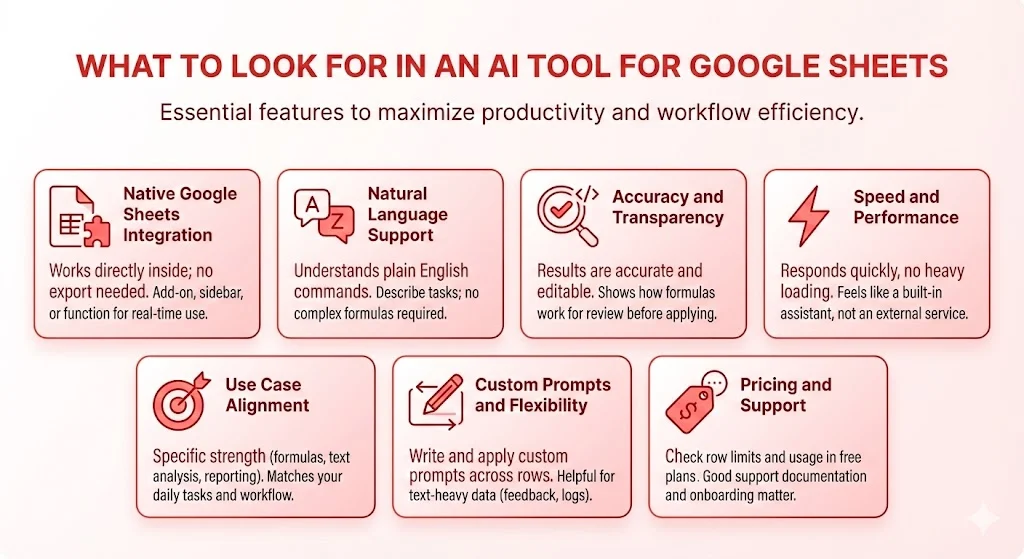
The first thing to check is whether the tool works directly inside Google Sheets. Native integration means no exporting or copying data. The AI appears as an add-on, sidebar, or function inside your sheet and works in real time.
2) Natural Language Support
A good AI tool should understand plain English commands. This allows users to describe tasks instead of writing formulas. This feature is useful for marketers, founders, students, and anyone who prefers simple instructions over technical syntax.
3) Accuracy and Transparency
AI results should be accurate and editable. The best tools show how a formula works and allow users to review it before applying. This is important for financial data, reporting, and operational use.
4) Speed and Performance
AI should respond quickly without heavy loading or repeated authentication. Slow tools interrupt workflow and reduce productivity. A good spreadsheet AI feels like a built-in assistant, not an external service.
5) Use Case Alignment
Each AI tool has a specific strength. Some focus on formulas. Others specialize in text analysis, reporting, or automation. Choosing a tool that matches your daily tasks makes a big difference in long-term value.
6) Custom Prompts and Flexibility
Advanced tools allow users to write custom prompts and apply them across rows. This is helpful for text-heavy data such as feedback, reviews, emails, and logs. Prompt flexibility adds long-term usefulness.
7) Pricing and Support
AI tools often limit rows or usage in free plans. Check pricing carefully and see what saves the most time. Support documentation and onboarding also matter for smooth adoption.
Top AI Tools for Google Sheets in 2025
1) Numerous AI
Numerous AI works as a smart assistant inside Google Sheets. Users can ask direct questions about their data and get answers instantly without writing formulas.
Key features
- Works as a Google Sheets add-on
- Supports natural language queries
- Generates formulas and summaries automatically
- Understands spreadsheet context
Best for
Users who want an intelligent assistant without technical complexity.
2) Formula Bot
Formula Bot converts plain text instructions into working Google Sheets formulas. It also explains how each formula works.
Key features
- Text to formula conversion
- Clear formula explanations
- Handles complex logic
- Reduces formula errors
Best for
Users who frequently need custom formulas but lack advanced spreadsheet skills.
3) PromptLoop
PromptLoop allows users to apply one AI prompt across many rows. It is useful for processing large text datasets.
Key features
- GPT-style prompts in cells
- Bulk text classification and summarization
- Works directly in Sheets
Best for
Ecommerce teams, marketers, researchers, and support teams handling large text data.
4) Powerdrill AI
Powerdrill AI focuses on insights and visualization. It helps users understand trends and patterns quickly.
Key features
- Detects anomalies and patterns
- Suggests charts automatically
- Generates narrative summaries
Best for
Teams that prepare weekly reports and growth analysis.
5) GPTExcel
GPTExcel combines AI logic with spreadsheet automation. It helps clean, explain, and transform data efficiently.
Key features
- Formula creation and explanation
- Data cleanup and formatting
- Text translation and standardization
Best for
Admins, solopreneurs, and virtual assistants managing repetitive spreadsheet tasks.
Using ChatGPT Inside Google Sheets
ChatGPT can be used to generate summaries, analyze patterns, clean data, and assist with reports. When connected properly, it works like a virtual assistant that understands both text and numbers.
It can help create dashboard descriptions, explain trends, suggest next steps, and even generate sample data for testing. Used correctly, it supports decision-making rather than replacing it.
Scaling Decisions With Numerous AI
Numerous AI helps businesses make faster decisions using spreadsheets. It supports tasks like product categorization, SEO content generation, hashtag creation, and sentiment analysis inside Google Sheets.
Users simply type a prompt into a cell and apply it across hundreds or thousands of rows. This allows teams to scale work without increasing manual effort. With tools like ChatGPT for Spreadsheets, Numerous AI turns spreadsheets into a powerful decision engine for both Google Sheets and Excel.
Tags: google sheets ai, ai spreadsheet tools, google sheets automation, chatgpt for sheets, spreadsheet ai tools
Related Posts :





Share This Post