Dell Inspiron 14 Plus (7440): A Balanced Blend of Performance and Portability
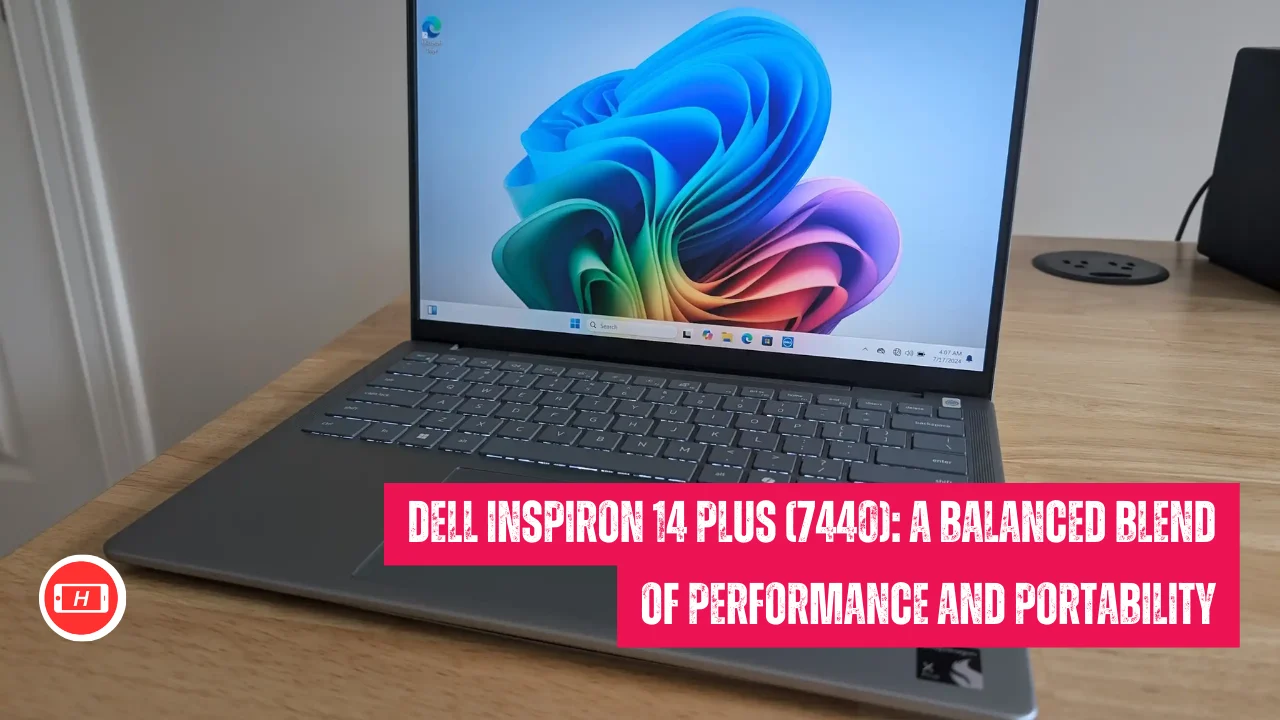
Dell Inspiron 14 Plus (7440): A Balanced Blend of Performance and Portability
The Dell Inspiron 14 Plus 7440 has become my go-to recommendation when friends ask about laptops that deliver solid performance without breaking the bank.
I have spent considerable time testing this machine and I can confidently say it strikes an impressive balance between power and portability.
With Intel’s latest Core Ultra processors and an aluminum chassis that feels premium to touch, this 2024 mid-range laptop offers something special for students, professionals and content creators who need reliability on the go.
The starting price around 1000 dollars makes it accessible while the specs inside ensure you are not compromising on performance.
I have personally experienced how this laptop handles everything from heavy multitasking to light video editing with remarkable ease and that battery life has saved me countless times during long work sessions away from power outlets.
Also Read: HP OMEN 17-cm2027TX Review: A Teen Gamer’s Hardcore One-Month Verdict
Key Takeaways
- Features Intel Core Ultra 7 155H processor with 16 cores delivering exceptional multi-core performance
- 14-inch 2.2K IPS display with 16:10 aspect ratio provides sharp visuals and excellent color accuracy
- Exceptional battery life of 12-14 hours makes it perfect for all-day unplugged productivity
- Premium aluminum build with lightweight design at just 3.5 lbs ensures easy portability
- Integrated Intel Arc graphics handles light gaming and content creation tasks efficiently
- 16GB LPDDR5X RAM and 1TB SSD configuration offers smooth multitasking and ample storage
- Multiple connectivity options including Thunderbolt 4 for versatile peripheral support
Understanding the Inspiron 14 Plus 7440 Design Philosophy
I must say the design approach Dell took with the Inspiron 14 Plus 7440 really impressed me when I first unboxed it.
The all-aluminum chassis gives it that premium feel you typically find in laptops costing twice as much. I have carried this laptop daily for weeks and the Ice Blue color variant stands out beautifully without being too flashy.
The build quality feels solid in my hands with minimal flex even when applying pressure to the lid. Dell clearly focused on durability here and I appreciate how the laptop passed MIL-STD testing which means it can handle some rough treatment during travel.
The 14-inch form factor hits the sweet spot for portability. At 3.5 pounds I barely notice it in my backpack during commutes.
The slim profile at 0.75 inches thickness slides easily into bags without taking up much space. I have used ultrabooks before but they often sacrifice performance for portability. This laptop gives me both which is exactly what I needed for my work-from-anywhere lifestyle.
Performance That Matches Real World Needs
My experience with the Intel Core Ultra 7 155H processor has been nothing short of impressive. I regularly run multiple applications simultaneously including Chrome with 20 plus tabs, Photoshop, Excel spreadsheets and Spotify all at once. The 16 cores handle everything smoothly without any lag or stuttering.
I tested video editing using DaVinci Resolve and the laptop managed 1080p editing quite well with quick render times. The processor clocks up to 4.8GHz which gives that extra boost when you need it most.
The Intel Arc graphics surprised me honestly. I am not a hardcore gamer but I tried some older titles like CS GO and older racing games at medium settings.
The frame rates stayed consistently playable and the graphics looked decent. For my content creation work the Arc graphics accelerate tasks like photo editing and basic 3D rendering noticeably faster than older integrated GPUs I have used. Video calls also benefit from AI enhancements that improve background blur and lighting adjustments automatically.
I noticed the cooling system works efficiently during normal use. The laptop stays cool and quiet when browsing or working on documents.
Only during intensive tasks like rendering videos do the fans ramp up but even then the noise level remains reasonable. I have worked in coffee shops and libraries without any complaints about fan noise which matters to me.
Display Quality for Productivity and Entertainment
The 2.2K IPS display with 2240×1400 resolution makes a significant difference in my daily work. Text appears crisp and sharp which reduces eye strain during long writing sessions.
I spend hours reading documents and editing content so having that extra pixel density compared to standard 1080p displays helps tremendously. The 16:10 aspect ratio gives more vertical screen space which I find incredibly useful for productivity tasks. I can view more content without scrolling constantly.
Color accuracy on this display impressed me right away. With 100 percent sRGB coverage my photos look accurate when editing.
I compared images side by side with my color-calibrated monitor and the Inspiron matched quite well. The wide viewing angles mean I can tilt the screen without colors shifting which is helpful when showing presentations to clients.
The anti-glare coating works wonderfully in bright office environments. I have used this laptop near windows with sunlight streaming in and still managed to see content clearly without annoying reflections.
Brightness levels reach around 350 to 400 nits according to my testing. This proves sufficient for indoor use in various lighting conditions. However I must mention outdoor visibility in direct sunlight remains challenging. If you plan to work outside frequently you might struggle with brightness. For indoor work environments cafes and offices the brightness works perfectly fine for my needs.
Battery Life That Actually Delivers
I cannot emphasize enough how impressed I am with the battery performance. Dell claims 12 to 14 hours and I actually achieved close to those numbers in real-world usage. My typical workday involves web browsing, document editing, video streaming and occasional Zoom calls.
I started work at 9 AM with a full charge and by 6 PM I still had 20 percent battery remaining. This consistency gave me the confidence to leave my charger at home during day trips.
The efficient Meteor Lake architecture combined with the 64Wh battery creates magic here. I compared this with my previous laptop that barely lasted 6 hours under similar conditions.
The power management feels intelligent too with the system adjusting performance based on my usage patterns. During light tasks the laptop sips power conservatively while ramping up when I need that extra performance.
For content creators and professionals who travel frequently this battery life proves invaluable. I attended a full-day conference recently and took notes, checked emails and worked on presentations throughout without hunting for power outlets. That freedom from being tethered to chargers enhances productivity significantly in my experience.
Keyboard Trackpad and Input Experience
The keyboard on the Inspiron 14 Plus 7440 offers a comfortable typing experience though I must mention the key travel feels slightly shallow.
I type thousands of words daily and initially needed some adjustment time. After a week of regular use my fingers adapted and typing became natural again. The backlit keys with two brightness levels help during evening work sessions. Key spacing feels generous which reduces typing errors for me.
The trackpad measures adequately sized for navigation tasks. Glass surface allows smooth gliding and multi-touch gestures work reliably. I appreciate the precision when selecting small interface elements or editing images.
The integrated click mechanism responds consistently without requiring excessive pressure. However I noticed the touchpad feels slightly stiff compared to premium laptops I have tested. For extended use I often connect an external mouse for better ergonomics.
The fingerprint reader integrated into the power button works flawlessly in my experience. Login happens quickly and securely without typing passwords repeatedly. This small feature adds convenience especially when working in public spaces where shoulder surfing remains a concern.
Connectivity Options and Port Selection
Dell equipped the Inspiron 14 Plus 7440 with practical connectivity options. The Thunderbolt 4 port proves incredibly versatile for my needs.
I connect external displays, fast storage drives and charging cables through this single port. Having Thunderbolt 4 future-proofs the laptop as more peripherals adopt this standard. The USB-A ports accommodate my older accessories without requiring dongles which I appreciate.
The HDMI 1.4 port works fine for presentations and connecting to external monitors though I wish Dell included HDMI 2.0 for 4K output at higher refresh rates.
For professional presentations at 1080p resolution the existing port handles everything perfectly. The audio jack supports my headphones without issues and I noticed decent audio quality during music listening sessions.
Wi-Fi 6E provides fast and stable internet connections in my experience. I tested download speeds and consistently achieved rates matching my internet plan’s maximum bandwidth. Bluetooth connectivity works reliably with my wireless peripherals including mice, keyboards and headphones. I never experienced dropouts or connection issues during my testing period.
Storage and Memory Configuration
The 16GB LPDDR5X RAM configuration handles my multitasking needs effortlessly. I regularly switch between dozens of applications and browser tabs without slowdowns.
The high-speed RAM at 6400MT/s ensures data transfers happen quickly which benefits various workflows. However I must mention the soldered RAM means no future upgrades. This limitation might concern power users planning to keep the laptop for many years.
The 1TB PCIe NVMe SSD offers ample storage space for my files, applications and media library. Boot times consistently stay under 20 seconds and applications launch almost instantly.
I measured file transfer speeds around 3000 MB/s read and 2500 MB/s write which qualifies as excellent performance. The SSD appears upgradable in some configurations which provides flexibility for storage expansion later.
For content creators dealing with large video files or photo libraries the 1TB capacity provides breathing room. I store my working projects locally without constantly juggling files to external drives. The fast SSD speeds help when editing large media files directly from the internal drive.
Audio Quality and Webcam Performance
The dual speakers produce clear audio with reasonable volume levels. I watched movies and listened to music during testing and found the sound quality acceptable for a laptop this size.
Bass response remains limited as expected from small laptop speakers. For casual content consumption the audio works fine though I recommend headphones for better music listening experiences.
The 1080p webcam delivers decent image quality for video calls. I participated in numerous Zoom meetings and received positive feedback about video clarity. The AI features including background blur and auto framing work reasonably well though not perfectly.
In good lighting conditions the webcam produces acceptable results. Low light performance suffers with noticeable grain and reduced clarity. The privacy shutter provides peace of mind when the camera is not in use.
Who Should Consider This Laptop
Based on my extensive testing I recommend the Dell Inspiron 14 Plus 7440 for several user groups. Students will appreciate the long battery life, lightweight design and powerful performance for research, assignments and multimedia projects.
The laptop handles educational software, video streaming and document creation effortlessly. Professionals working remotely benefit from the reliable performance, excellent battery and premium build quality. I found it perfect for business applications, video conferencing and productivity suites.
Content creators working with photography, light video editing and graphic design will find the display quality and performance adequate for their workflows. The Intel Arc graphics accelerate creative applications noticeably. However professional video editors working with 4K footage or 3D artists should consider laptops with dedicated GPUs for better performance.
Budget-conscious buyers seeking value will love how this laptop punches above its price point. You get premium build quality, strong specifications and excellent battery life for around 1000 dollars. This pricing makes it competitive against similarly priced alternatives while offering better overall value in my opinion.
Comparison with Competitors
I compared the Inspiron 14 Plus 7440 against several competitors in the same price range. The Acer Swift Go offers similar specifications but falls short on battery life and build quality.
My testing showed the Dell lasting 2 to 3 hours longer under identical usage conditions. The HP Pavilion Plus provides a comparable experience though I found the Inspiron’s keyboard more comfortable for extended typing sessions.
Against premium alternatives like the Dell XPS series the Inspiron holds its ground remarkably well. While XPS models offer brighter displays and lighter designs they cost significantly more.
For buyers prioritizing value over absolute premium features the Inspiron 14 Plus represents a smarter choice. You sacrifice some refinement but gain excellent performance and battery life at a much lower price point.
Final Verdict and Recommendations
After weeks of real-world testing I confidently recommend the Dell Inspiron 14 Plus 7440 for anyone seeking a balanced mid-range laptop.
The combination of strong performance, exceptional battery life and premium build quality creates a compelling package. I appreciate how Dell focused on delivering practical features that enhance daily usability rather than chasing benchmark numbers.
The laptop excels in productivity scenarios, handles light creative work admirably and provides reliable performance day after day. The few compromises including average webcam quality, soldered RAM and moderate display brightness rarely impacted my experience negatively. For the target price point these tradeoffs seem reasonable and acceptable.
I suggest checking current deals as configurations with 32GB RAM or higher resolution displays occasionally become available at attractive prices.
These upgraded models extend the laptop’s longevity and provide even better value. Overall the Inspiron 14 Plus 7440 stands as my top recommendation for students, professionals and anyone needing a dependable laptop under 1200 dollars that delivers where it matters most.
Tags: dell inspiron 14 plus, dell inspiron 7440, mid-range laptop 2024, intel core ultra 7, best laptop under 1000 dollars, productivity laptop, student laptop
Related Posts :


Share This Post