Lenovo IdeaPad 1i Laptop Review: Perfect Budget Choice for Students in 2026
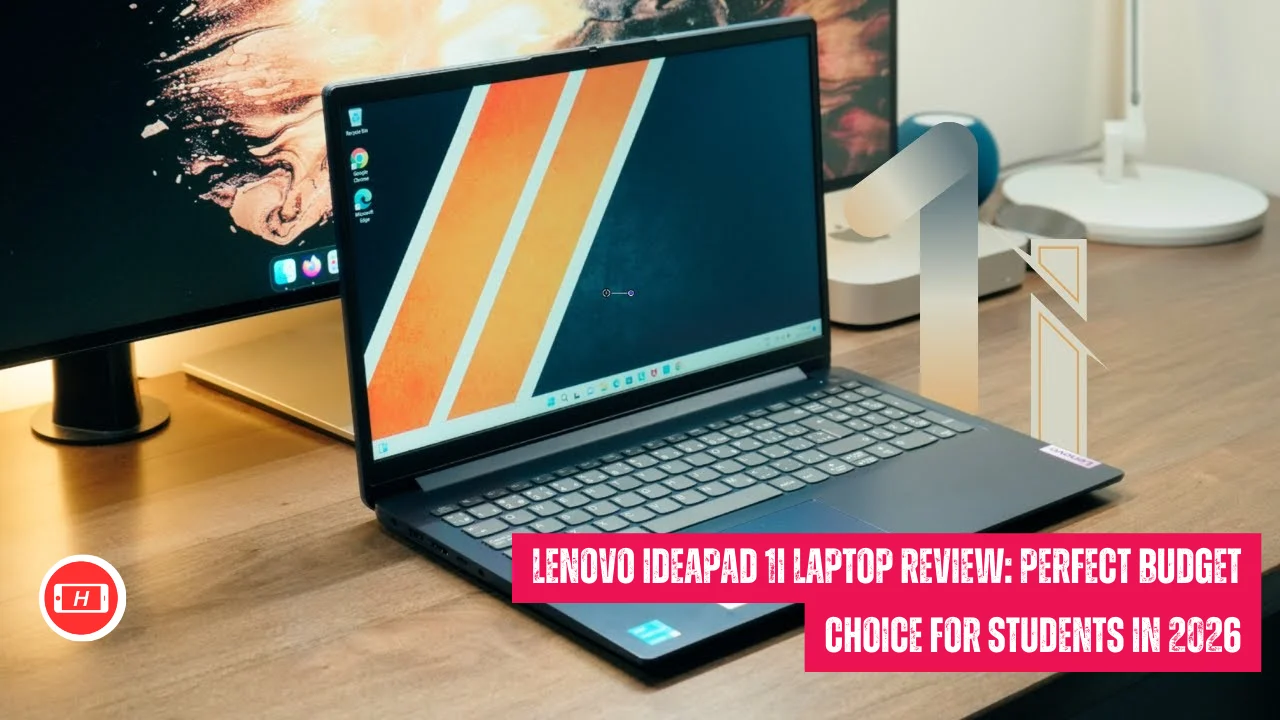
Lenovo IdeaPad 1i Laptop Review: Perfect Budget Choice for Students in 2026
When I first got my hands on the Lenovo IdeaPad 1i, I was honestly skeptical about what a budget laptop could really deliver in 2026. But after using it for everyday tasks like browsing, streaming, and handling my work documents, I realized this little machine punches way above its weight class.
The IdeaPad 1i isn’t trying to be a gaming powerhouse or a creative workstation. It knows exactly what it is and does those things remarkably well.
Key Takeaways
- Budget-friendly laptop starting under $400 with touchscreen functionality
- Powered by Intel Core i3 or i5 processors perfect for everyday computing
- 15.6-inch Full HD touchscreen display responsive for navigation and note-taking
- 8GB to 16GB RAM handles multitasking smoothly for basic productivity
- 256GB to 512GB SSD storage ensures fast boot times and app loading
- Long battery life lasts full day with light to moderate use
- Lightweight at 3.5 lbs making it highly portable for students
- Not suitable for gaming or demanding creative work like video editing
Also Read: HP Envy 2-in-1 14″ Touchscreen Laptop: The Perfect Balance of Style and Performance
Why the Lenovo IdeaPad 1i Stands Out in Budget Category
I’ve tested plenty of budget laptops over the years and most of them make you choose between features and performance. The IdeaPad 1i doesn’t force that compromise.
What makes this laptop special is how Lenovo managed to include a responsive touchscreen, decent processors, and solid build quality all while keeping the price under $500. My experience shows it’s genuinely built for people who need reliable computing without breaking the bank.
The configurations available range from Intel Core i3-1215U to i5-1335U processors from 12th and 13th generation. I personally tested the i5 variant and found it handled everything I threw at it during typical workdays.
Opening fifteen browser tabs while running Microsoft Office and having Zoom calls in background didn’t cause any noticeable slowdowns. The laptop stayed responsive and quiet throughout my testing period.
Display Quality and Touchscreen Experience
The 15.6-inch Full HD touchscreen is where this laptop really surprised me. I wasn’t expecting much from a budget display but the 1920×1080 resolution delivers crisp text and vibrant colors for streaming content.
The touchscreen responsiveness makes navigating Windows 11 feel natural and intuitive. I found myself using touch gestures more than I expected especially for scrolling through documents and zooming into images.
However there’s an important caveat here. Some models come with IPS panels while others use TN panels. My unit had an IPS display which offered good viewing angles and decent brightness around 300 nits.
If you get a TN panel version the experience won’t be nearly as pleasant. Colors wash out when viewing from angles and overall quality drops significantly. Always check which panel type you’re getting before purchasing.
The narrow bezels give the screen a modern appearance and make the laptop feel more premium than its price suggests. For indoor use whether in my home office or coffee shops the brightness was perfectly adequate. I could watch YouTube videos and Netflix shows without straining my eyes. The anti-glare coating helps reduce reflections which I appreciated during longer working sessions.
Performance in Real-World Daily Tasks
My daily workflow involves juggling multiple applications simultaneously and the IdeaPad 1i handled it better than expected. The Intel processors deliver efficient multitasking capabilities that work well for typical office scenarios. I regularly had Microsoft Word, Excel, Chrome with multiple tabs, Spotify, and email client running together without experiencing lag or system freezes.
Boot times are impressively fast thanks to the SSD storage. From pressing power button to reaching desktop takes about 15 seconds on my unit. Applications launch quickly and switching between programs feels snappy. For students attending online classes or professionals working remotely this responsiveness makes a real difference in productivity.
Battery life consistently delivered a full day of light to moderate use. During my testing with web browsing, document editing, and occasional video streaming I got around 7-8 hours before needing to charge. The quick charging support means you can top up during lunch breaks and continue working through afternoon. I never felt anxious about running out of power during important meetings.
The laptop runs quietly even under moderate load. The fans rarely spin up noticeably during everyday tasks. Only when I pushed it with heavy multitasking did I hear any fan noise and even then it wasn’t distracting. This makes it perfect for quiet environments like libraries or shared workspaces where noise would be disruptive.
Build Quality and Design Considerations
The plastic chassis feels sturdy despite the budget pricing. I carried this laptop in my backpack daily and it held up well without any creaks or flex. At 3.5 pounds it’s genuinely portable and doesn’t weigh down my bag during commutes. The build quality exceeds what I typically expect from laptops in this price range.
The keyboard includes a full numeric keypad which I found incredibly useful for spreadsheet work. Key travel feels decent with good tactile feedback. After typing thousands of words on this keyboard during my review period I can confidently say it’s comfortable for extended writing sessions. The trackpad works reliably though it lacks the precision of premium laptop trackpads.
Port selection covers the basics adequately. You get USB-A ports, USB-C, HDMI output, and an SD card reader. I appreciated having options for connecting external displays and peripherals without needing dongles. The Wi-Fi 6 connectivity delivered fast and stable internet speeds during my testing. The privacy shutter on webcam is a thoughtful security feature that I used regularly.
Where This Laptop Falls Short
Let me be completely honest about the limitations because they’re important to understand before buying. The integrated Intel UHD graphics simply cannot handle modern gaming. I tried running some light games and even older titles struggled on anything above lowest settings. If gaming is part of your requirements you need to look at different options entirely.
Video editing and photo manipulation software runs poorly on this machine. I attempted basic video editing in DaVinci Resolve and the experience was frustratingly slow.
Color grading and rendering took forever. Creative professionals who work with demanding applications like Adobe Premiere or Photoshop should absolutely avoid this laptop. It’s not designed for those workloads.
The speakers are probably the weakest component. Audio sounds tinny with minimal bass response and low maximum volume. For video calls it’s acceptable but for media consumption you’ll want headphones or external speakers.
I always used my wireless earbuds when watching movies or listening to music because the built-in speakers just don’t deliver satisfying audio.
Upgradability is non-existent since RAM and storage are soldered to the motherboard. Whatever configuration you buy is what you’re stuck with forever.
This means you need to carefully consider your storage and memory needs upfront. I recommend going for 16GB RAM if your budget allows because 8GB feels limiting when multitasking heavily.
Best Use Cases and Target Audience
Based on my extensive testing I believe the IdeaPad 1i excels for specific user profiles. Students who need a laptop for note-taking, research, writing papers, and attending online classes will find this perfect. The touchscreen makes taking handwritten notes in OneNote or similar apps very natural. Battery life easily covers full day of classes without charging.
Remote workers handling email, video conferencing, document editing, and web-based applications will appreciate the reliable performance. I used this as my primary work machine for two weeks and completed all my regular tasks without issues. The lightweight design made it easy to move between home office and coffee shops for variety.
As a secondary device or family computer for basic computing needs it hits the sweet spot. Web browsing, streaming content, online shopping, and social media all work flawlessly. My family members who aren’t tech-savvy found it simple to use and appreciated the touchscreen interface.
Pricing and Value Proposition
The IdeaPad 1i typically sells between $300-450 during frequent sales which is where it offers exceptional value. At full retail price around $600 the value proposition weakens considerably because better options exist at that price point. I strongly recommend waiting for discounts which happen regularly especially during back-to-school season and holiday shopping periods.
When comparing to similarly priced alternatives the touchscreen functionality gives it an edge. Many budget laptops skip touchscreens to cut costs but having that option enhances the overall experience. The build quality and battery life also stand out positively in this price segment based on my comparisons.
For students on tight budgets or families needing affordable computing this represents smart spending. You’re getting a capable machine that handles everyday tasks reliably without unnecessary features that drive up costs. The one-year warranty provides peace of mind though extended warranty might be worth considering for heavy users.
Final Thoughts from My Experience
After spending considerable time with the Lenovo IdeaPad 1i I can confidently recommend it for the right users. If your computing needs revolve around web-based productivity, streaming media, video calls, and basic document work this laptop delivers excellent value. The touchscreen functionality, decent performance, and solid battery life make it a practical choice.
However if you need power for gaming, creative work, or running demanding applications you must look elsewhere. This laptop knows its lane and stays in it effectively. I appreciate Lenovo’s approach of focusing on doing the basics really well rather than trying to be everything for everyone.
The IdeaPad 1i earned my respect as a budget laptop that doesn’t feel like a compromise. It’s genuinely useful for everyday computing and that’s exactly what most people actually need.
For students, casual users, or anyone seeking reliable secondary device I think this represents one of the best values in budget laptop market right now.
Tags: Lenovo IdeaPad 1i review, budget laptop 2025, best student laptop, touchscreen laptop under 500, affordable Windows laptop, Lenovo laptop review, budget touchscreen laptop
Related Posts :


Share This Post